Showing posts with label Internet. Show all posts

Wednesday, June 20, 2012

Something new to worry about online


Be careful what you click on when searching the Web; the international cybercrime community is coming for you.

That's the message from Internet security firm Blue Coat, which earlier this year found that poisoned search engine results remain the number one malware threat on the Web, accounting for a full 40 percent of all cyberattacks in 2011.
The popular bait-and-switch tactic is nearly four times more likely to snag unsuspecting users than the once common email-based approach, which now only accounts for 11 percent of attacks. Social networking rounds out the top three threats with 6.5 percent. The Blue Coat report was based on an analysis of the Web traffic of more than 75 million users. 
"Searching is at least as dangerous as going into your email in-box and clicking on things," Chris Larsen, Blue Coat's chief malware expert, recently told USA Today.
The scam works like this:
The bad guys set up themed "bait sites" using terms that are likely to show up in search engine results, as a way to trick users into visiting their sites. When the unsuspecting user clicks on a poisoned result in their search engine, thinking they are going to a legitimate site related to their search, they are served a site designed by the phishers to gather their financial information or get them to download a piece of malware or otherwise fall victim to whatever scam they are running. In many cases, users don't even know they have been victimized until it's too late.
What you can do.
  • Scan the site description — Google and Bing display two lines of "flavor text" alongside their text search results, which can provide clues to the site's provenance. "Look for disjointed, random text, like it was mashed up by a computer (because it was)."
  • Check out the domain name — "Is it one you've heard of? Does it seem to have something to do with the topic you were searching for?"
  • Preview before clicking — "Google now has a 'preview' feature, where text-search results have a little button to the right. If you hover your mouse on it, it will display an image of the page. This lets you see if the page 'looks legit.'"
  • Know your top level domains (TLDs) — "There are a lot of two-letter TLDs assigned to specific countries: .RU = Russia, .IN = India, etc. If you're searching for a U.S. culture topic, like Halloween costume ideas, or Thanksgiving recipes, or Christmas decorations and your search returns results on .RU or .IN, etc, ask yourself if it's likely that a site hosted there would really have good content about your search topic."
  • Use protection — It's always important to protect your computer with antivirus and antimalware software, which will block many of the malicious infrastructures that run search engine poisoning attacks.
Learn more.

Saturday, March 31, 2012

Defending the Internet

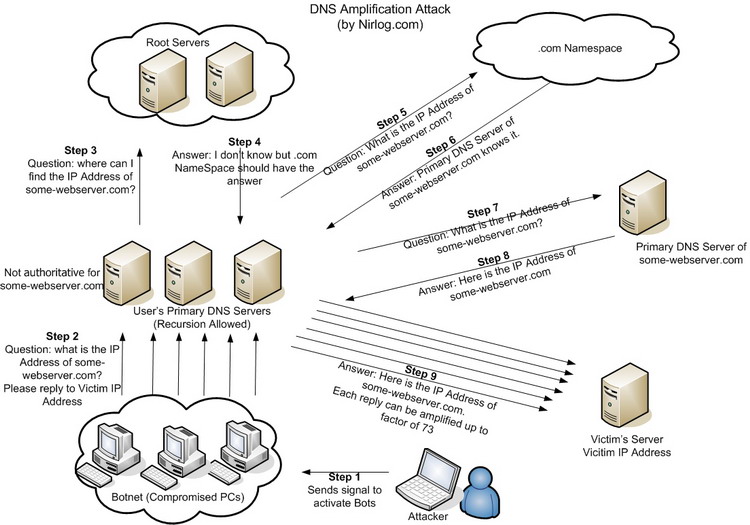
Today is anything but a normal Saturday for the people who run the Domain Name System, which converts human-friendly domain names like google.com into numeric addresses that are more useful for computers, The New York Times reports.
They plan to be glued to their monitors, looking out for signs of unusual network traffic, communicating with one other through encrypted, digitally signed e-mails or through a private telephone hot line maintained just for this purpose.
That's because on a quiet Sunday in mid-February, something curious attracted the attention of the behind-the-scenes engineers who scour the Internet for signs of trouble.
There, among the ubiquitous boasts posted by the hacking collective Anonymous, was a call to attack some of the network’s most crucial parts. The message called it Operation Global Blackout, and rallied Anonymous supporters worldwide.
It declared when the attack would be carried out: March 31. And it detailed exactly how: by bombarding the Domain Name System with junk traffic in an effort to overwhelm it altogether.

Engineers created a fast-track, multimillion-dollar global effort to beef up the Domain Name System, adding enough computing power to handle a denial of service attack.

Personally, I think they wanted to shut down this blog.

Wednesday, March 14, 2012

A sign of the times


After 244 years, the Encyclopaedia Britannica is going out of print.
Those coolly authoritative, gold-lettered reference books that were once sold door-to-door by a fleet of traveling salesmen and displayed as proud fixtures in American homes will be discontinued, company executives said. 
In an acknowledgment of the realities of the digital age — and of competition from the Web site Wikipedia — Encyclopaedia Britannica will focus primarily on its online encyclopedias and educational curriculum for schools. The last print version is the 32-volume 2010 edition, which weighs 129 pounds and includes new entries on global warming and the Human Genome Project. 
“It’s a rite of passage in this new era,” Jorge Cauz, the president of Encyclopaedia Britannica Inc., a company based in Chicago, said in an interview. “Some people will feel sad about it and nostalgic about it. But we have a better tool now. The Web site is continuously updated, it’s much more expansive and it has multimedia.”
Gutenberg first used moveable type 573 years ago. The World Wide Web opened for business 21 years ago. I got all of this post from the Web. You will read it on the Web.

Saturday, October 15, 2011

Facebook is really, really big

Facebook now has as many users as the entire Internet did back in 2004, the year Facebook was founded.

Facebook’s active user base is…
  • 2.5x the population of the United States
  • 3.9x the population of Brazil
  • 5.8x the population of Russia
  • 6.3x the population of Japan
Another fact: Facebook is bigger than a bread box.

Thursday, August 18, 2011

They're watching you


Major websites such as MSN.com and Hulu.com have been tracking people's online activities using powerful new methods that are almost impossible for computer users to detect, the Wall Street Journal reports.
The new techniques, which are legal, reach beyond the traditional "cookie," a small file that websites routinely install on users' computers to help track their activities online. Hulu and MSN were installing files known as "supercookies," which are capable of re-creating users' profiles after people deleted regular cookies, according to researchers at Stanford University and University of California at Berkeley.
As consumers become savvier about protecting their privacy online, the new techniques appear to be gaining ground.
Stanford researcher Jonathan Mayer, a Stanford Ph.D. candidate, identified what is known as a "history stealing" tracking service on Flixster.com, a social-networking service for movie fans recently acquired by Time Warner Inc., and on Charter Communications Inc.'s Charter.net.
Such tracking peers into people's Web-browsing histories to see if they previously had visited any of more than 1,500 websites, including ones dealing with fertility problems, menopause and credit repair, the researchers said. History stealing has been identified on other sites in recent years, but rarely at that scale.
Gathering information about Web-browsing history can offer valuable clues about people's interests, concerns or household finances, the Journal says. Someone researching a disease online, for example, might be thought to have the illness, or at least to be worried about it.

Creepy.

Friday, April 8, 2011

Don't talk to strangers

If a stranger came up to you on the sidewalk and asked for your Social Security number, you wouldn't give it to him. If a stranger on the sidewalk invited you to go through a door into a building with him, you wouldn't.

So when an email asks for some personal information, or invites you to click to go somewhere else, why would you?

The subject comes up, because a security breach that exposed the email addresses of potentially millions of customers of major U.S. banks, hotels and stores is more likely than traditional scams to ultimately trick people into revealing personal information.
Security experts are alarmed that the breach involved targeted information -- tying individuals to businesses they patronize -- and could make customers more likely to reveal passwords, Social Security numbers and other sensitive data.
Smart Money has some insight.
“Now the bad guys know who you do business with,” says Chester Wisniewski, senior security adviser at online security firm Sophos. “The likely outcome as far as fraud is concerned will be people impersonating the institutions they’ve compromised. If they contact you it will likely come in the form of a phishing attack [an email, or phone call if your number is listed, asking you for more information] or try to lure you online to a malicious link.”
And some advice. Read the whole article, but here is some of it.
When to do nothing: Don’t reply to emails that ask for personal information such as passwords, bank account or credit card details – even if the email mentions Epsilon and tried to scare you by saying your account is compromised. No legitimate company would ask you to do this. If you receive a suspicious phone call from your bank, hang up and call the bank yourself. Don’t let curiosity get the better of you either: don’t open email attachments or follow links by email, Twitter or Facebook, even if they have been “forwarded” to you by a friend.

When to take action: If you already use your email as a password for an online account, change it. If you use your name, or an easy variation of your name as a password like JohnDoe123, change it. But do this on the company’s own website. Never do this if asked to by email.

What to do in the future: Use secondary, less important email addresses when registering online accounts. Keep one for this and others for businesses, friends and family. If a secondary account starts receiving spam, it will be easier to shut it down without too much inconvenience.

Monday, February 7, 2011

Some facts about passwords

Most-used passwords: 123456, password, 12345678, qwerty, abc123

Time it takes a hacker's computer to randomly guess your password:
 
Length: 6 characters
Lowercase: 10 minutes
+ Uppercase: 10 hours
+ Nos. & Symbols: 18 days

Length: 7 characters
Lowercase: 4 hours
+ Uppercase: 23 days
+ Nos. & Symbols: 4 years

Length: 8 characters
Lowercase: 4 days
+ Uppercase: 3 years
+ Nos. & Symbols: 463 years

Length: 9 characters
Lowercase: 4 months
+ Uppercase: 178 years
+ Nos. & Symbols: 44,530 years

-- Bloomberg Businessweek

Saturday, January 15, 2011

Our online world

Map of the Internet
Pingdom, an Internet monitoring service, corralled a number of research reports and company statistics to create a picture of the year in online stuff. Here's the data:

Internet Users
  • 1.97 billion – Internet users worldwide (June 2010).
  • 14% – Increase in Internet users since the previous year.

Email
  • 107 trillion – The number of emails sent on the Internet in 2010.
  • 294 billion – Average number of email messages per day.
  • 1.88 billion – The number of email users worldwide.
  • 480 million – New email users since the year before.
  • 89.1% – The share of emails that were spam.
Websites
  • 255 million – The number of websites as of December 2010.
  • 21.4 million – Added websites in 2010.

Social Media
  • 152 million – The number of blogs on the Internet
  • 25 billion – Number of sent tweets on Twitter in 2010
  • 100 million – New accounts added on Twitter in 2010
  • 175 million – People on Twitter as of September 2010
  • 600 million – People on Facebook at the end of 2010.
  • 250 million – New people on Facebook in 2010.
  • 30 billion – Pieces of content (links, notes, photos, etc.) shared on Facebook per month.
  • 20 million – The number of Facebook apps installed each day.
Videos and Pictures
  • 2 billion – The number of videos watched per day on YouTube.
  • 35 – Hours of video uploaded to YouTube every minute.
  • 186 – The number of online videos the average Internet user watches in a month (USA).
  • 5 billion – Photos hosted by Flickr (September 2010).
  • 3000+ – Photos uploaded per minute to Flickr.
  • 130 million – At the above rate, the number of photos uploaded per month to Flickr.
  • 3+ billion – Photos uploaded per month to Facebook.
  • 36 billion – At the current rate, the number of photos uploaded to Facebook per year.

Tuesday, September 28, 2010

Unseen visitors to your computer

Just because you're paranoid doesn't mean someone isn't following your every move online.

A startup called PubMatic is launching a new tool to help websites determine how many tracking files are being installed on users’ computers, The Wall Street Journal reports.
“The harm is that profiles [of users] are being built without the publisher knowing about it,” CEO Rajeev Goel says. The company using the hidden tracking files can then make money by selling the user’s profile to advertisers without the Web publisher’s knowledge, he said. And the files can slow the website down as well.

Mr. Goel said the number of tracking tools used varies widely depending on the website and the ad network involved. He said he sometimes sees as many as 10 to 12 invisible tools — often referred to as “pixels” or “beacons” — being placed via one ad.
A competitor, Rubicon Project, is testing a similar technology.

Friday, September 10, 2010

Using Wikipedia wisely

I turn to Wikipedia many times during the day, particularly for background information when I'm blogging. It has a reputation for being unreliable -- students are advised not to cite it in their papers -- but I'm familiar enough with judging the quality of information from many years as a journalist and editor that I'm comfortable with it.


Here's what Wikipedia says.
As a wiki, articles are never considered complete and may be continually edited and improved. Over time, this generally results in an upward trend of quality and a growing consensus over a neutral representation of information.
Users should be aware that not all articles are of encyclopedic quality from the start: they may contain false or debatable information. Indeed, many articles start their lives as displaying a single viewpoint; and, after a long process of discussion, debate, and argument, they gradually take on a neutral point of view reached through consensus. 
Others may, for a while, become caught up in a heavily unbalanced viewpoint which can take some time—months perhaps—to achieve better balanced coverage of their subject. In part, this is because editors often contribute content in which they have a particular interest and do not attempt to make each article that they edit comprehensive. However, eventually, additional editors expand and contribute to articles and strive to achieve balance and comprehensive coverage. In addition, Wikipedia operates a number of internal resolution processes that can assist when editors disagree on content and approach. Usually, editors eventually reach a consensus on ways to improve the article.
I would not rely on Wikipedia for anything critical or controversial, but I'm okay using it for, say, biographical notes on people. It's easy to judge the reliability of a piece by the information it contains and by checking the footnotes, which I do often. Obviously, what it says about health matters is useful, but I wouldn't self-diagnose from it. Or anything else on the Internet. Duh.


Here are some fascinating facts about Wikipedia.
  • It has 3,407,151 articles, and 21,482,217 pages in total.
  • There have been 411,792,023 edits.
  • There are 849,873 uploaded files.
  • There are 13,019,628 registered users, including 1,754 administrators.
Those numbers come from Wikipedia's own entry about itself, which is constantly updated. And this is one of the strengths of the site. As it says:
Unlike printed encyclopedias, Wikipedia is continually created and updated, with articles on historic events appearing within minutes, rather than months or years.
Because I'm usually looking for basic facts about something, I'll go to Wikipedia first. And for most topics, I've found, Wikipedia is nearly always at the top of a Google search.